

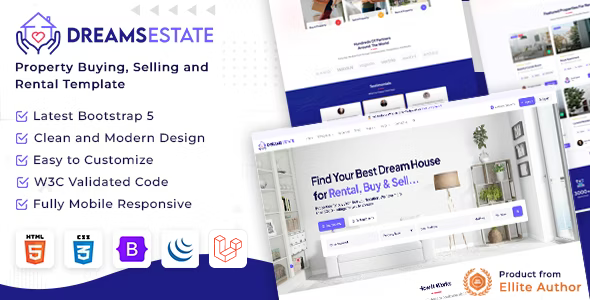
DreamsEstate is a properties sale and rent HTML Template designed to meet the needs of estate buy and rent platform. With its clean and responsive design, DreamsEstate is perfect for all kinds of Real Estate Agency, Agents companies, property, real estate, rental, houses, apartments, a broker and more.
Project Overview
The project follows a modular structure with clear separation of concerns.
DreamsEstate/
│
├── html/
│   │
│   ├── template/
│   │   │
│   │   ├── index.html
│   │   │
│   │   ├── assets/
│   │   │   ├── css/
│   │   │   ├── fonts/
│   │   │   ├── img/
│   │   │   ├── js/
│   │   │   └── plugins/
│   │   │   └── scss/
│   │   ├── admin/
│   │   │   ├── css/
│   │   │   ├── fonts/
│   │   │   ├── img/
│   │   │   ├── js/
│   │   │   └── plugins/
│   │   │   └── scss/
	<!DOCTYPE html>
		<html lang="en">
		<head>
			<meta charset="utf-8">
			<meta name="viewport" content="width=device-width, initial-scale=1.0, user-scalable=0">
			<title>DreamsEstate</title>
			<link rel="shortcut icon" href="assets/img/favicon.png">
			<link rel="stylesheet" href="assets/css/bootstrap.min.css">
			<link rel="stylesheet" href="assets/plugins/fontawesome/css/fontawesome.min.css">
			<link rel="stylesheet" href="assets/plugins/fontawesome/css/all.min.css">
			<link rel="stylesheet" href="assets/css/style.css">
		</head>
		<body>
			<div class="main-wrapper">
				<header class="header">
				</header>
				<div class="breadcrumb-bar">
				</div>
				<div class="content">
					<div class="container">
					</div>
				</div>
			</div>
			<script src="assets/js/bootstrap.bundle.min.js"></script>
			<script src="assets/js/script.js"></script>
		</body>
	</html>
Prerequisites
Node.js Installation
Before installing Sass, ensure you have Node.js installed on your system:
https://nodejs.org/en/download/
Install Sass
If you use Node.js, you can also install Sass using npm by running
npm install -g sasssass --watch main.scss:../css/style.cssInstallation Steps
Unzip Template Files
After downloading, extract the DreamsEstate package. Inside, you will find the folder HTML (Source Code), which contains all necessary files.
Copy Files to Server
Open the HTML folder, then copy all files and paste them into your localhost directory (e.g., htdocs for XAMPP, www for WAMP) or directly into your web server’s root folder.
Run in Browser
Once the files are in place, you can
open the template in any modern web browser (Chrome,
Firefox, Safari, Edge) from your PC or laptop. Simply
navigate to localhost/
Before installing Sass, ensure you
have Node.js installed on your system: If you use Node.js, you can also
install Sass using npm by running After downloading, extract the
DreamsEstate package. Inside, you will find the folder HTML
(Source Code), which contains all necessary files. Open the HTML folder, then copy all
files and paste them into your localhost directory (e.g.,
htdocs for XAMPP, www for WAMP) or directly into your web
server’s root folder. Once the files are in place, you can
open the template in any modern web browser (Chrome,
Firefox, Safari, Edge) from your PC or laptop. Simply
navigate to localhost/DreamsEstate/index.html or
www.example.com/index.html or the domain where you uploaded
the template.Prerequisites
Node.js Installation
https://nodejs.org/en/download/
Install Sass
npm install -g sasssass --watch main.scss:../css/style.cssInstallation
Steps
Unzip Template Files
Copy Files to Server
Run in Browser
Step 1:
Install Node.js
Node.js is a run-time environment which includes everything you need to execute a program written in JavaScript. It’s used for running scripts on the server to render content before it is delivered to a web browser. In a web browser, navigate to https://nodejs.org/en/download/..
Step 2:
Initialize NPM
Npm is the package for JavaScript and the world's largest software registry. Npm is a separate project from node.js, and tends to update more drequently. As a result, even if uou've just downloaded Node.js (and therefore npm), you'll probably need to update your npm.
Step 3:
Install Node-Sass
Node-sass is a library that provides binding for Node.js to LibSass, the C version of the popular stylesheet preprocessor, Sass.
Step 4:
Write Node-sass Command (sass --watch main.scss:../css/style.css)
Step 5:
Run the Script
Install Node.js
Node.js is a run-time environment which includes everything you need to execute a program written in JavaScript. It’s used for running scripts on the server to render content before it is delivered to a web browser. In a web browser, navigate to https://nodejs.org/en/download/..
Update Your NPM
Npm is the package for JavaScript and the world's largest software registry. Npm is a separate project from node.js, and tends to update more drequently. As a result, even if uou've just downloaded Node.js (and therefore npm), you'll probably need to update your npm.
npm install --global npm@latestInstall all dependencies
If you want to update or develop this theme, you need to install all dependencies by running:
npm installInstall Sass
If you use Node.js, you can also install Sass using npm by running
npm install -g sasssass --watch main.scss:../css/style.css
Use Font Awesome icons with spesific class
	<!DOCTYPE html>
	<html lang="en">
		<head>
			<link rel="stylesheet" href="assets/plugins/fontawesome/css/fontawesome.min.css">
			<link rel="stylesheet" href="assets/plugins/fontawesome/css/all.min.css">
		</head>
	</html>
	<i class="fas fa-times"></i>
	<i class="fas fa-chevron-down"></i>
	<i class="fa-regular fa-user"></i>
DreamsEstate is developed by Dreams Technologies and is available under both Envato Extended & Regular License options.
Regular License
Usage by either yourself or a single client is permitted for a single end product, provided that end users are not subject to any charges.
Extended License
For use by you or one client in a single end product for which end users may be charged.
What are the main differences between the Regular License and the Extended License?
If you operate as a freelancer or agency, you have the option to acquire the Extended License, which permits you to utilize the item across multiple projects on behalf of your clients.
| NAME | URL |
|---|---|
| Bootstrap | https://getbootstrap.com/docs/ |
| Fontawesome | https://fontawesome.com/ |
| Flatpickr | https://flatpickr.js.org/ |
| Google Fonts | https://fonts.google.com/ |
Need Support?
If this documentation does not address your questions, please feel free to contact us via email at support@dreamstechnologies.com
Reach the team at GMT+5:30. Typical reply within 12–24 hours on weekdays — rarely up to 48 hrs during holidays. Support is available to verified buyers for template-related issues.
Contact SupportImportant Note : We strive to offer top-notch support, but it's only available to verified buyers and for template-related issues such as bugs and errors. Custom changes and third-party module setups are not covered.
Do you need a customized application for your business?
If you need a customized application for your business depends on your specific requirements and goals, Please contact us. Customization can be the key to success, ensuring your project perfectly aligns with your unique goals and requirements.
Don't Miss Out on the Benefits of Customization!
Unlock the potential of your project. It's time to ensure your project isn't another cookie-cutter solution but truly unique and effective one.
Discover how customization can make a difference in your project's success. Let's create a solution that's as unique as your vision!
We'll tailor the application to meet your specific needs and preferences.
We will upload your website to the server and ensure it is live.

Thank You
Thank you once again for downloading DreamsEstate.
We hope you're enjoying your experience, and we kindly request that you take a
moment to share your valuable review and rating with us.